Debugging a Privacy Page Scroll Jump Bug in Next.js
Build log on debugging a Next.js Privacy Policy page scroll jump issue by removing hash anchors, disabling smooth scroll on the page, adding a privacy-only scroll stabilizer, clearing stale hash state, and verifying the page with build and local HTML checks.
Introduction
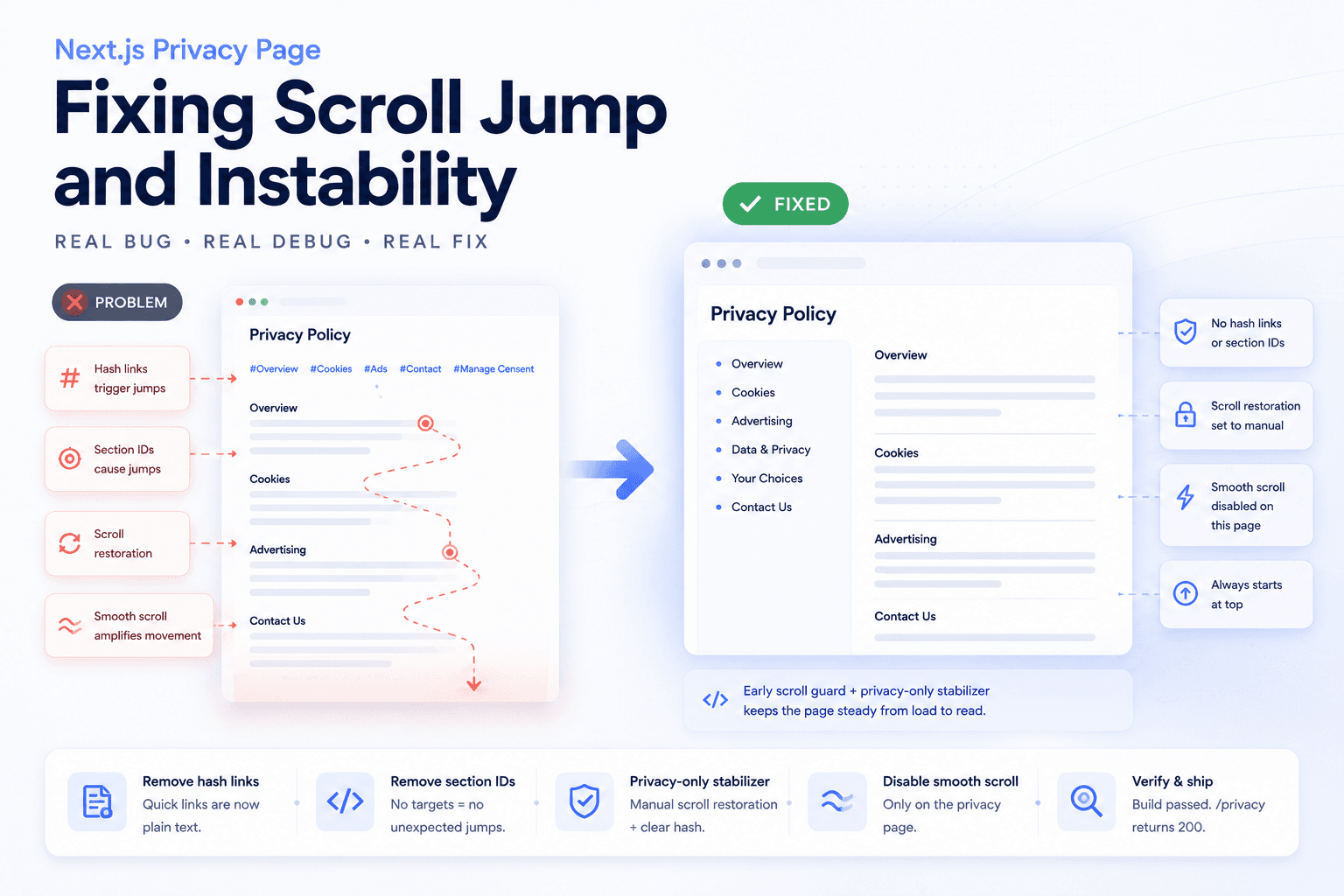
I ran into a page-specific frontend bug on a Next.js site: the Privacy Policy page kept jumping up and down after loading.
The confusing part was that the problem only happened on the Privacy page. Other pages were stable. That meant the issue was probably not a global layout problem, not a general browser problem, and not a simple CSS spacing issue.
This note documents how I debugged the Privacy page as its own scroll behavior bug, instead of continuing to guess from common causes.
The Problem
The observed behavior was simple:
Open /privacy
The page loads
The scroll position moves by itself
The page appears to jump down and back up
Only the Privacy page has this problem
This kind of bug is frustrating because it does not always show up as an obvious error in the console. The page renders, the content exists, and the route returns 200. But the reading experience is broken because the browser keeps changing the scroll position.
The Wrong Assumption
The first wrong assumption was treating it like a generic layout issue.
Common guesses include:
Maybe an image loads late
Maybe the consent banner changes height
Maybe the sticky nav shifts the layout
Maybe hydration changes the page height
Maybe an ad placeholder is causing movement
Those can be valid causes on some pages, but they did not explain why only the Privacy page kept jumping.
The better question was:
What does the Privacy page have that other pages do not?
Source Inspection
After inspecting the Privacy page source, the suspicious pattern became clearer.
The page still had many internal hash links and section targets:
href="#overview"
href="#cookies"
href="#contact"
href="#manage-consent"
section id="cookies"
section id="contact"
scroll-mt classes
At the same time, the site had global smooth scrolling enabled.
That combination made the Privacy page different from normal article pages. It had many built-in scroll targets and several ways for the browser to reposition the document.
Root Cause
The likely root cause was not one single line of code. It was the interaction between several scroll behaviors:
Privacy page hash anchors
Section id targets
Global smooth scroll
Browser scroll restoration
Possible stale URL hash
Consent or page hydration timing
A browser can remember a previous scroll position. A hash in the URL can ask the browser to jump to a section. Smooth scrolling can animate that movement. React hydration can then change timing again.
When all of these exist on the same page, the result can look like the page is moving on its own.
Fix Direction
The Privacy page did not actually need interactive hash navigation.
A Privacy Policy page is mostly a reading page. It does not need quick links that jump the user around while the browser is also trying to restore scroll position.
So the fix direction was:
Remove internal hash navigation
Remove section hash targets
Disable smooth scroll only for this page
Prevent browser scroll restoration on /privacy
Force the page to start at the top
Verify actual served HTML, not only source files
This keeps the Privacy page stable without changing scroll behavior across the whole site.
Fix 1: Remove Internal Hash Links
The first fix was to remove clickable internal hash links from the Privacy page.
Instead of rendering quick links like this:
<a href="#cookies">Cookies</a>
<a href="#contact">Contact</a>
<a href="#manage-consent">Manage consent</a>
I changed the quick-link area into a plain topic list.
The list still helps the reader understand the page structure, but it no longer triggers browser-level hash navigation.
Fix 2: Remove Section Hash Targets
Removing links was not enough. If the page still had section ids, a stale hash in the URL could still target those sections.
So I also removed the section-level scroll targets from the Privacy page:
section id="cookies"
section id="contact"
section id="manage-consent"
scroll-mt-24
That made the page behave more like a normal document instead of a page with many addressable scroll targets.
Fix 3: Add a Privacy-Only Scroll Stabilizer
The next fix was to add a page-specific scroll stabilizer.
The stabilizer is only for the Privacy page. Its job is to keep this page from restoring an old scroll position or reacting to a stale hash.
The behavior is:
Set history.scrollRestoration to manual
Clear stale hash state when needed
Scroll to the top on load
Avoid affecting other pages
This is important because a global scroll fix would be too risky. Other pages may still need normal browser scroll restoration.
Fix 4: Disable Smooth Scroll Only When Needed
The site used smooth scrolling globally. Smooth scrolling is usually fine for anchor navigation, but it can make debugging scroll jumps harder because it turns position changes into visible movement.
Instead of removing smooth scrolling globally, I added a page-specific class:
html.no-smooth-scroll
Then the Privacy page can temporarily disable smooth scroll while it stabilizes the initial scroll position.
This keeps the fix narrow. The Privacy page becomes stable without changing the interaction behavior of unrelated pages.
Fix 5: Add an Early Scroll Guard
A React component runs after the page starts hydrating. For a scroll bug, that may be too late because the browser can restore position before React finishes loading.
So I added an early guard directly in the Privacy page output.
The purpose was:
Run before hydration
Disable scroll restoration early
Clear stale hash behavior early
Start from the top before the user sees movement
This is the difference between fixing a jump after it happens and preventing the jump from happening in the first place.
Verification
After the changes, I verified both the source and the actual served page.
The checks were:
No href="#..." remains on /privacy
No section hash target remains on /privacy
No scroll-mt target remains on /privacy
npm run build passed
/privacy returned 200 locally
Served HTML contained the early scroll guard
Served HTML did not contain old hash anchors
This step matters because checking source files alone is not enough. A dev server can serve stale output, and a page can still contain generated HTML that differs from what I expected.
Before and After
Before the fix, the Privacy page had multiple scroll triggers:
Quick links used href="#..."
Sections had matching ids
Global smooth scroll was active
The browser could restore an old scroll position
A stale hash could target a lower section
The page appeared to jump during load
After the fix, the Privacy page became a stable reading page:
Quick links became plain text
Section hash targets were removed
Smooth scroll could be disabled only for this page
Scroll restoration was set to manual
The page starts from the top
Build and local route checks passed
The Main Gotcha
The main gotcha is that scroll bugs can be caused by several small features working together.
A hash link is normal. Smooth scroll is normal. Browser scroll restoration is normal. Sticky navigation is normal. Hydration is normal.
But on a long policy page, all of them together can create unstable behavior.
The practical lesson is:
If only one page scrolls by itself, inspect that page’s anchors, ids, hash state, and scroll restoration behavior before blaming the whole layout.
Mental Model
The mental model I use now is:
href="#section" = browser may jump
section id="section" = valid scroll target
scroll-smooth = movement becomes animated
scroll restoration = browser may return to previous position
hydration = timing can change after initial HTML
long policy page = more room for visible jumps
A stable page should not have unnecessary scroll targets. If the page is mainly for reading, a plain table of contents can be safer than hash navigation.
Practical Checklist
For a page-specific scroll jump bug, I would check:
1. Does the page have href="#..." links?
2. Does the page have matching section ids?
3. Is global smooth scroll enabled?
4. Does the URL contain a stale hash?
5. Is the browser restoring an old scroll position?
6. Does a consent banner or overlay change layout timing?
7. Does the page scroll before or after React hydration?
8. Does the served HTML still contain old anchors?
9. Does the route return 200 after the fix?
10. Does npm run build still pass?
This checklist is more useful than guessing from generic layout bugs.
Final Takeaway
The final takeaway is simple:
A Privacy Policy page should be stable before it is interactive.
For this bug, the best fix was not adding more JavaScript everywhere. It was removing unnecessary hash navigation, disabling smooth scroll only where needed, preventing browser scroll restoration on the Privacy page, and verifying the actual served HTML.
That made the Privacy page behave like a stable reading page instead of a page with competing scroll instructions.
What this note covers
- Introduction
- The Problem
- The Wrong Assumption
- Source Inspection
Related technical notes
Last updated: June 30, 2026
Related category: Web Development
Related stories
Curated reads to continue the thread.
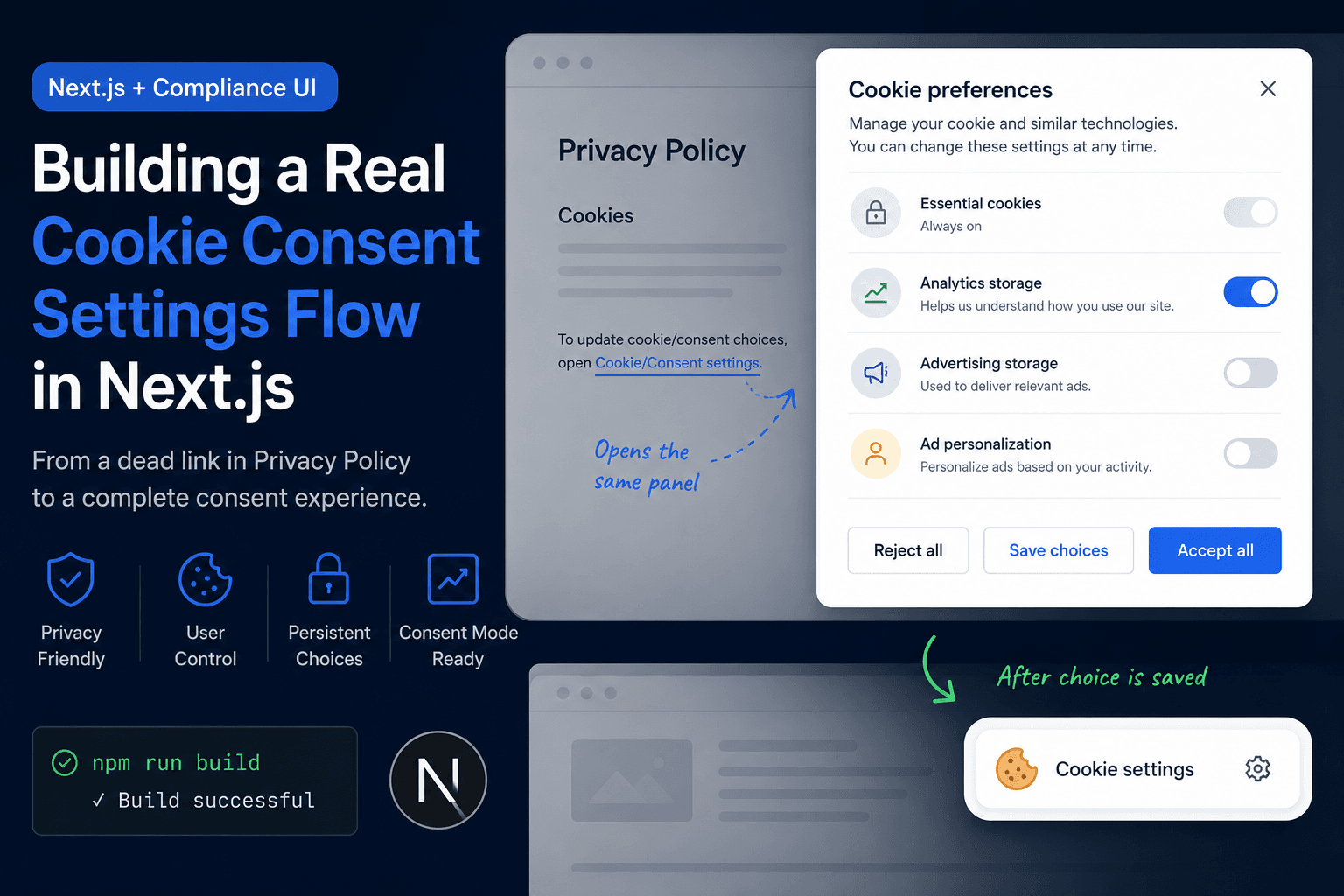
Building a Real Cookie Consent Settings Flow in Next.js
A practical frontend implementation note on fixing a Privacy Policy cookie settings link that did nothing, then turning it into a real consent settings flow with a bottom-right banner, saved choices, and a reusable settings panel.
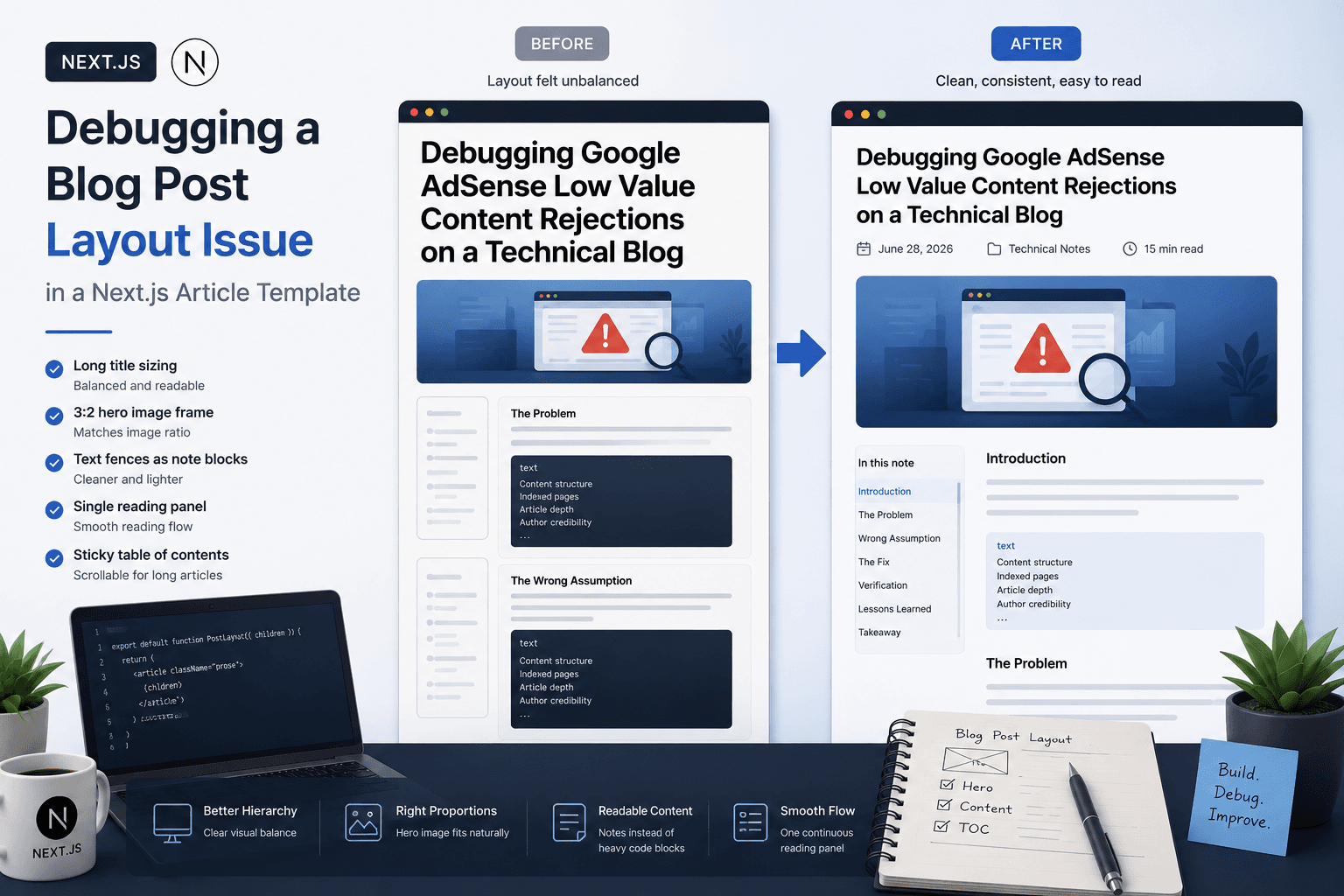
Debugging a Blog Post Layout Issue in a Next.js Article Template
A practical frontend debugging note on fixing a Next.js blog post page where the layout issue came from the article template, not the post content.

Turning a Next.js Blog into a Technical Content Hub
A practical Next.js refactor note on restructuring a blog into a clearer technical content hub with topic paths, case studies, author signals, metadata, sitemap updates, and article-level internal linking.
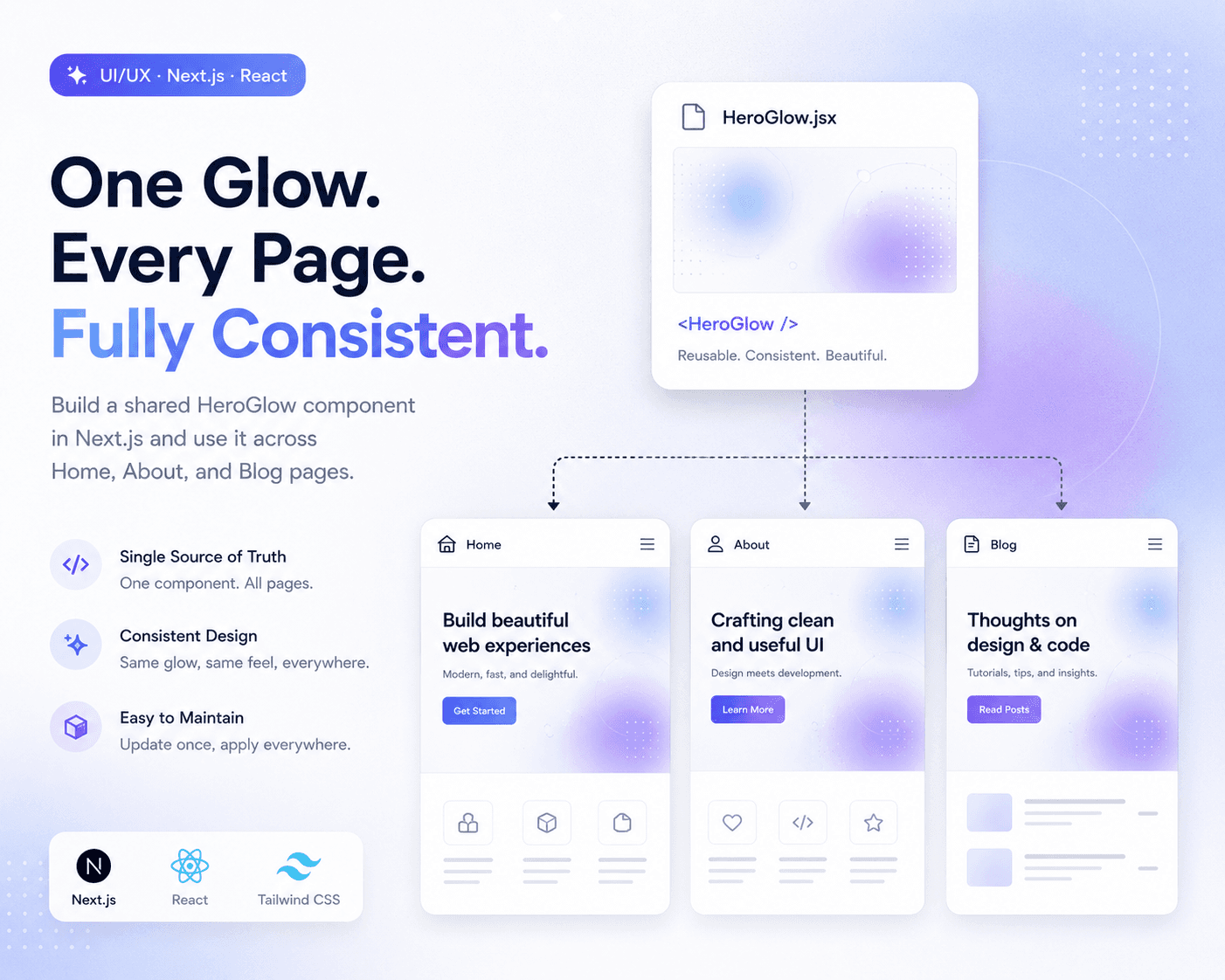
Refactoring Hero Glow Effects into a Shared Next.js Component
A practical frontend refactor note on making Home, About, and Blog hero sections visually consistent by extracting the shared glow background into one reusable Next.js component.

Restructuring a Next.js Research Website: Blog vs Publications
A practical information architecture note on separating blog posts, publications, and projects in a Next.js research website so the site feels clearer, more credible, and easier to navigate.

Deploying One Git Project to Both GitHub and Hugging Face Spaces
A practical Git deployment note on managing two remotes in one project: pushing source code to GitHub while also deploying the same app to Hugging Face Spaces.

Fixing Git Push Upstream Errors After Creating a New Remote
A practical Git build log on fixing the fatal: current branch main has no upstream branch error after connecting a local project to a new remote repository.

Fixing Low Value Content Risk on a Small Technical Site
A practical site audit note on why a small tool or service-style site may look weak for AdSense, and how to restructure it into a clearer technical content site with categories, author context, internal links, and real implementation notes.